Collections Management and National Accounts Setup
In Collections Management, to use the National Account feature in order to consolidate the information between the Parent and the Child Accounts, the Parent and Child accounts will first need to be setup.
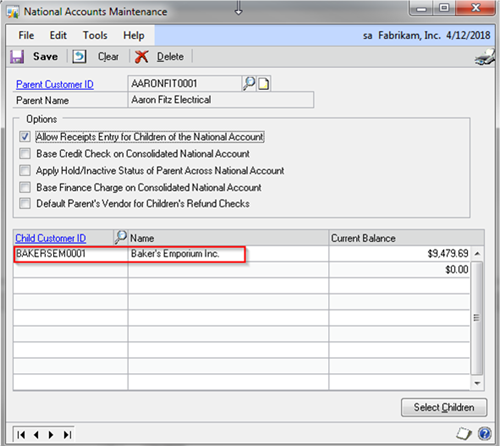
This setup is completed via the National Account Maintenance window:
Cards > Sales > National Accounts > Select the Parent Customer ID > Select Children: Select the Child Customer ID needed to be associated with the Parent Customer ID> select the option(s) under Options pertaining to your Parent-Child Accounts > Click Save
With this setup in place:
A
>>>When accessing the Parent Account in the Collections Management Main Window, considering that the national account group option is checked (Collections Management Main Window >Options > National Account > Group), the information accessed via the Collections Management Main Window, will be the consolidated information pertaining to both the Parent account and the child account(s)
B
>>>Additionally, in the Collections Query Letters and the Collections Main Contact Window, when accessing the parent account record, considering that the national account option is checked, the invoices pertaining to both the parent accounts and child accounts can be retrieved not only in the body of the Collections Letters sent to the customer, but also as attachments.
CATEGORIES:
TAGS: