Create a Task to be Completed by Assigned Collector
By Griffin Swanson Thursday, July 16, 2020
Create a Task to be completed by assigned Collector
Step 1
- On the Home Page, click on the Sales dropdown
- Select Customers
- Highlight Customer No. 30000 (School of Fine Art)
- Click on the Customer dropdown
- Select Collection Cockpit
- This will open the Collection Cockpit for Customer No. 30000
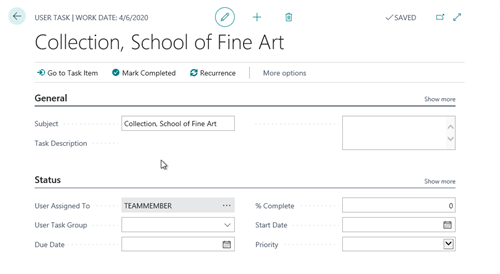
- Click on Create Task
- This will open a Collection User Task assigned to the associated Collector (TEAMMEMBER)
Step 2
- Subject = Email incorrect, call to obtain new address
- Task Description = Emails sent to current email specified are returned as undeliverable. Please contact the customer to obtain a current email address.
- Exit the
- Search for the User Tasks list
- Click on Email incorrect, call to obtain new address
- Click Mark Completed
- Click Go to Task Item
- Click on the Navigate dropdown
- Select Card
- This will navigate to the Customer page where the email address could be updated
- Click Back
- Enter a message in the Note field (01/01/2020 – updated customer email address to [email protected]
CATEGORIES:
TAGS: